Enterprise deployment: Microsoft Intune
Blue Light Maps is available in the public Play Store, as such you can add it to your Managed Play Store.
| Name | Blue Light Maps |
| Description | Specialist maps & navigation for emergency services |
| Publisher | Blue Light Maps Limited |
| App Store URL | https://play.google.com/store/apps/details?id=app.bluelightmaps |
| Bundle name | app.bluelightmaps |
| Minimum OS | Android 9.0 |
| Privacy URL | https://bluelightmaps.com/privacy |
| Information URL | https://docs.bluelightmaps.com |
To license the app correctly, you’ll need to create an App Configuration in the InTune portal.
1. Apps → Configuration → Create → Managed devices
Section titled “1. Apps → Configuration → Create → Managed devices”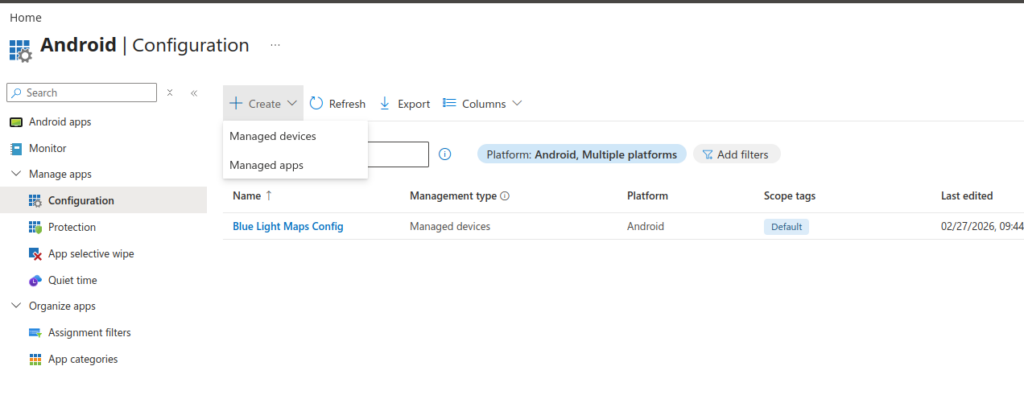
2. Create config policy
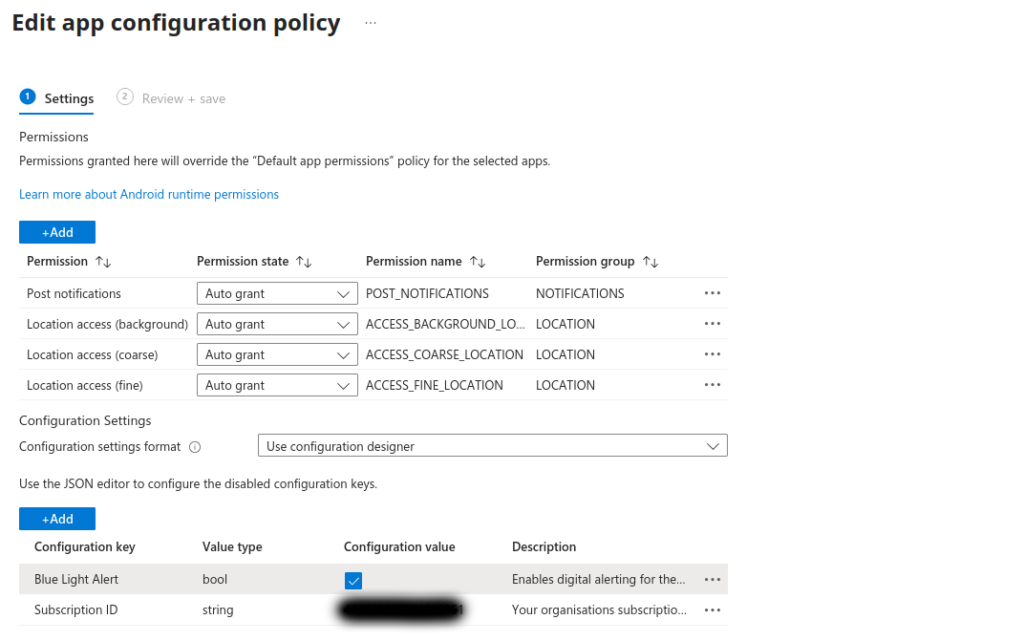
Section titled “2. Create config policy”- Ensure all 3 location permissions are granted, as well as POST_NOTIFICATIONS
- Using the configuration designer, add the Configuration key ‘Subscription ID’
- The subscription ID for your organisation will be provided by your Blue Light Maps contact
- If you have the Blue Light Alert add-on, you can disable it for groups of devices by having a separate configuration policy for those groups that sets ‘Blue Light Alert’ to false
- Then apply the configuration policy to the groups/devices in-line with your purchase